
MacumbaEditor
IDE de retrocomputadoras
IDE for retrocomputers
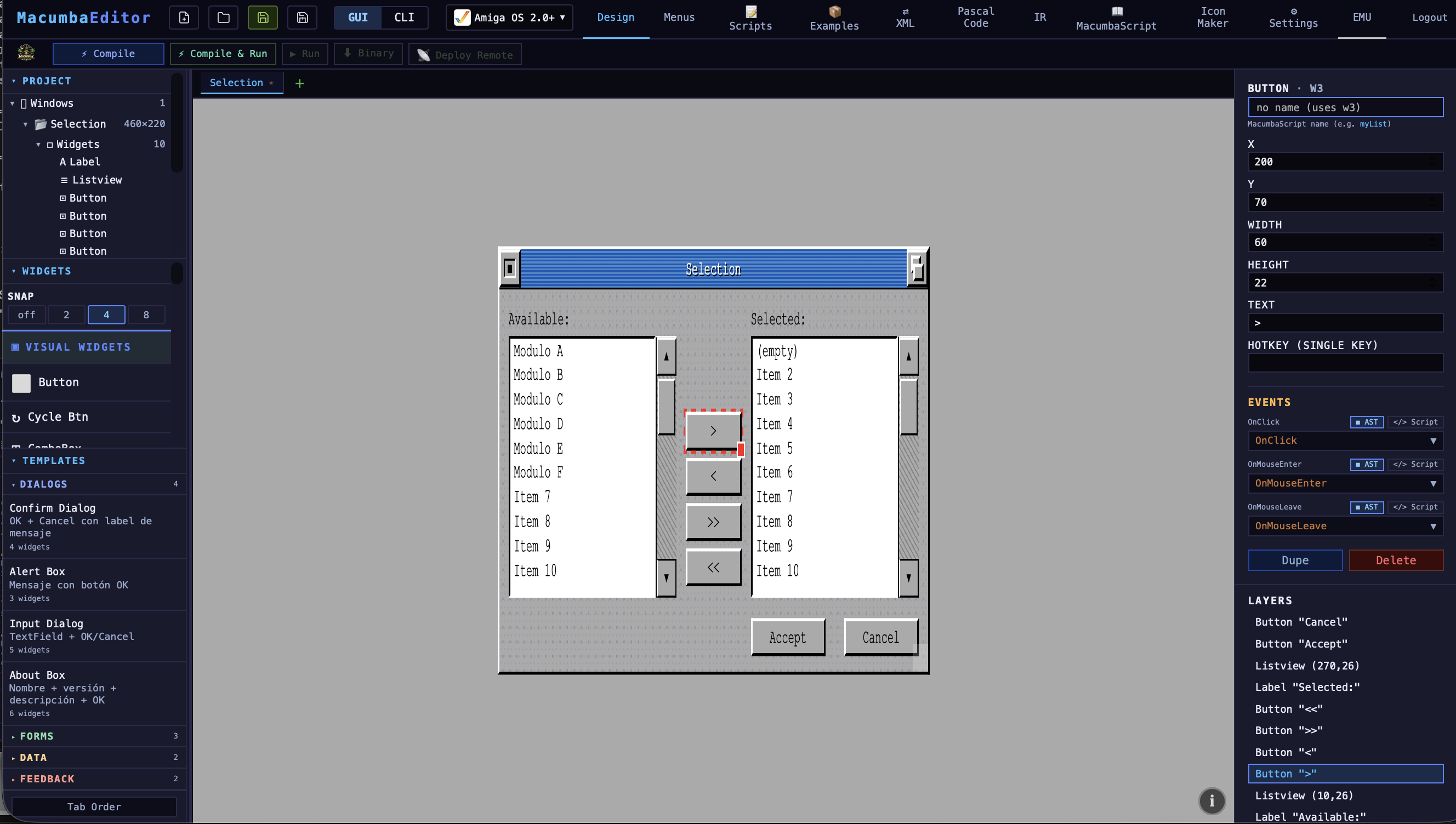
¿Alguna vez pensaron lo increíble que hubiera sido tener algo tipo Delphi o Visual Basic para Amiga? Pero además poder desarrollar hoy de una forma moderna, visual y cómoda — sin reescribir todo para cada plataforma.
Esa es la idea detrás de MacumbaEditor. Un solo proyecto. Un solo editor visual. Un solo lenguaje de scripts: MacumbaScript. Y desde ahí, generar aplicaciones nativas para Amiga (AmigaOS 2.0+ y AmigaOS 1.x), Mac Classic, Atari ST, MS‑DOS, PDP‑11… y alguna plataforma más que probablemente no se estén imaginando.
La idea no es emular ni hacer wrappers modernos disfrazados de retro. La idea es generar código real y nativo para cada sistema, respetando cómo funciona cada máquina de verdad. Como si los RAD de los 90 hubieran seguido evolucionando… pero unos años más atrás y fuera de x86.
Ever wondered how amazing it would have been to have something like Delphi or Visual Basic for the Amiga? Or to be able to develop today in a modern, visual, comfortable way — without rewriting everything for every platform?
That's the core idea behind MacumbaEditor. One project. One visual editor. One scripting language: MacumbaScript. From there, it generates real native applications for Amiga (AmigaOS 2.0+ and AmigaOS 1.x), Mac Classic, Atari ST, MS‑DOS, PDP‑11… and a few more platforms you probably haven't even considered.
This isn't about emulating, or wrapping modern code in a retro skin. The goal is genuine native binaries for each system — respecting how each machine actually works. As if the RAD tools of the 90s had kept evolving… just a few years further back, and off x86.
Qué es MacumbaEditor, en concreto
MacumbaEditor son tres piezas que se complementan:
- Editor visual de componentes — arrastrás widgets a un canvas y los configurás desde un panel de propiedades editables (texto, tamaño, posición, estado).
- Bloques AST (Abstract Syntax Tree — "árbol sintáctico" de bloques) — lógica reactiva sin escribir código: para cada evento de cada widget (OnClick, OnChange, OnEnterKey…) armás la acción combinando bloques predefinidos desde la GUI ("Mostrar mensaje", "Cambiar label", "Abrir ventana", "Filtrar lista", "Si tal cosa, entonces…"). Internamente cada bloque es un nodo de un árbol que el codegen convierte en Pascal o C nativo. Pensalo como un Scratch para retro — sirve para prototipos rápidos o si directamente no querés tocar texto.
- MacumbaScript — un lenguaje de scripting propio, tipo Pascal aligerado, para cuando la lógica se pone más fina. Conoce los widgets del canvas; transpila 1:1 a Pascal o C nativo sin runtime extra.
Sin ponernos detallistas con terminología académica, la idea es una capa de abstracción de desarrollo orientado a eventos para plataformas vintage. El paradigma de "cuando pasa X, hacé Y" — bien conocido en Delphi, VB y varios IDEs de los 90s — aplicado a las máquinas de 16 bits.
Y como los bloques AST y MacumbaScript conviven por widget, un proyecto puede mezclar ambos: el botón "OK" cierra la ventana con un bloque AST, y el botón "Calcular" hace cuentas con MacumbaScript.
What MacumbaEditor actually is
MacumbaEditor is three pieces working together:
- Visual component editor — drag widgets onto a canvas and configure them via an editable properties panel (text, size, position, state).
- AST blocks (Abstract Syntax Tree of visual building blocks) — reactive logic without writing code: for every event on every widget (OnClick, OnChange, OnEnterKey…) you assemble the action by combining predefined blocks from the GUI ("Show message", "Change label", "Open window", "Filter list", "If… then…"). Internally each block is a node in a tree that the codegen turns into native Pascal or C. Think of it as Scratch for retro — perfect for fast prototypes or if you just don't want to touch text.
- MacumbaScript — a custom scripting language, Pascal‑lite, for when the logic needs finer control. It's widget‑aware; transpiles 1:1 to native Pascal or C, with no extra runtime.
Without getting too precious about academic terminology, the idea is to provide an event‑driven development abstraction layer for vintage platforms. The "when X happens, do Y" paradigm — well known from Delphi, VB, and several 90s IDEs — applied to 16‑bit machines.
Because AST blocks and MacumbaScript coexist per widget, a project can mix both: the "OK" button closes the window with an AST block, the "Compute" button crunches numbers in MacumbaScript.
Componentes disponibles
Siguiendo la inspiración de Delphi, lo que mete a MacumbaEditor en el carril RAD es la librería de componentes. Está pensada para cubrir el 95% de las necesidades de una app retro sin pelearte con APIs nativas. Se divide en visuales (widgets que ves en pantalla) y no‑visuales (servicios de runtime — red, archivos, sonido, etc.).
▸ Widgets visuales
▸ Componentes no‑visuales
-
TCPSocket [Amiga + Mac — por ahora] — cliente TCP nativo: connect, send, receive, close. Por ahora soportado en Amiga (vía
bsdsocket.library) y Mac Classic (vía MacTCP / OpenTransport). DOS y ST van a venir más adelante. -
Serial driver de puerto serie con configuración de baud, paridad, handshake (RTS/CTS), timeouts, modo línea o crudo. Amiga (
serial.device), ST, Mac y DOS (COM1‑4 auto‑probe). -
JSON_FILE lectura y escritura de archivos JSON nativos (objetos clave/valor) para persistir configuración o datos de la app.
-
TEXT_FILE archivos de texto: open, readLine, writeLine, close. Modo binario también disponible.
-
ProgressWindow ventana modal con barra de progreso y opción de cancel, para operaciones largas (file I/O, "deployments", etc.).
-
Sound [Amiga only — por ahora] — reproducción de samples nativos usando Paula vía
audio.device. Las otras plataformas todavía no tienen backend de sonido implementado. -
Iconify [Amiga only] — minimización de la app como "AppIcon" en el Workbench. Es una feature muy específica de AmigaOS; no tiene equivalente directo en las otras plataformas, así que por ahora vive solo ahí.
Cada componente sabe cómo mapearse a las APIs nativas de cada
plataforma — un mismo TCPSocket usa
bsdsocket.library en Amiga y MacTCP / OpenTransport
en Mac. El código que escribís en MacumbaScript es el mismo en
todas.
▸ Múltiples ventanas en la misma app
Una app de MacumbaEditor puede tener varias ventanas, no solo una. Diseñás cada una por separado en el editor visual — la principal y todas las secundarias — y desde el código las abrís y cerrás cuando hace falta.
Ejemplo típico: una app con su ventana main y aparte una ventana de Settings. La de Settings la abrís haciendo click en un botón "Preferencias…" y se cierra con OK / Cancel. Podés disparar ese flujo de dos formas:
- Bloques visuales (AST) — en el OnClick del
botón ponés un bloque
Open Window: Settings, sin escribir código. - MacumbaScript — si querés lógica más fina:
OpenWindow(Settings)/CloseWindow(Settings), con condiciones, valores que pasen entre ventanas, etc.
Cada ventana tiene su propio canvas, sus propios widgets y sus propios event handlers. El cambio entre ventanas es nativo en cada plataforma (en Amiga abre una Intuition window real, en Mac una ventana de Toolbox, etc.) — no son tabs disfrazados.
Available components
Following the Delphi lineage, what puts MacumbaEditor in proper RAD territory is the component library. It's designed to cover 95% of what a retro app needs without having to fight native APIs. It splits into visual (widgets you see on screen) and non‑visual (runtime services — network, files, sound, etc.).
▸ Visual widgets
▸ Non‑visual components
-
TCPSocket [Amiga + Mac — for now] — native TCP client: connect, send, receive, close. Currently supported on Amiga (via
bsdsocket.library) and Mac Classic (via MacTCP / OpenTransport). DOS and ST are coming later. -
Serial serial port driver with baud, parity, handshake (RTS/CTS), timeouts, line or raw mode. Amiga (
serial.device), ST, Mac and DOS (COM1‑4 auto‑probed). -
JSON_FILE native JSON file read/write (key/value objects) for persisting app configuration or data.
-
TEXT_FILE text files: open, readLine, writeLine, close. Binary mode available too.
-
ProgressWindow modal window with a progress bar and optional cancel, for long operations (file I/O, deploys, etc.).
-
Sound [Amiga only — for now] — native sample playback through Paula via
audio.device. The other platforms don't have a sound backend yet. -
Iconify [Amiga only] — minimizing the app as an "AppIcon" on the Workbench. This is a very AmigaOS‑specific feature with no direct equivalent on the other platforms, so for now it lives there only.
Each component knows how to map onto every platform's native APIs
— the same TCPSocket uses
bsdsocket.library on Amiga and MacTCP / OpenTransport
on Mac. The MacumbaScript code you write stays the same wherever
it's supported.
▸ Multiple windows in one app
A MacumbaEditor app can have several windows, not just one. You design each one separately in the visual editor — the main window plus any number of secondary ones — and open or close them from code as needed.
Typical example: an app with its main window plus a separate Settings window. The Settings window opens when the user clicks a "Preferences…" button, and closes on OK / Cancel. You can drive that flow two ways:
- Visual blocks (AST) — in the button's OnClick
drop in an
Open Window: Settingsblock, no code required. - MacumbaScript — if you want finer control:
OpenWindow(Settings)/CloseWindow(Settings), with conditions, values passed between windows, etc.
Each window has its own canvas, its own widgets and its own event handlers. Switching between windows is native on every platform (on Amiga it opens a real Intuition window, on Mac a Toolbox window, etc.) — these aren't tabs in disguise.
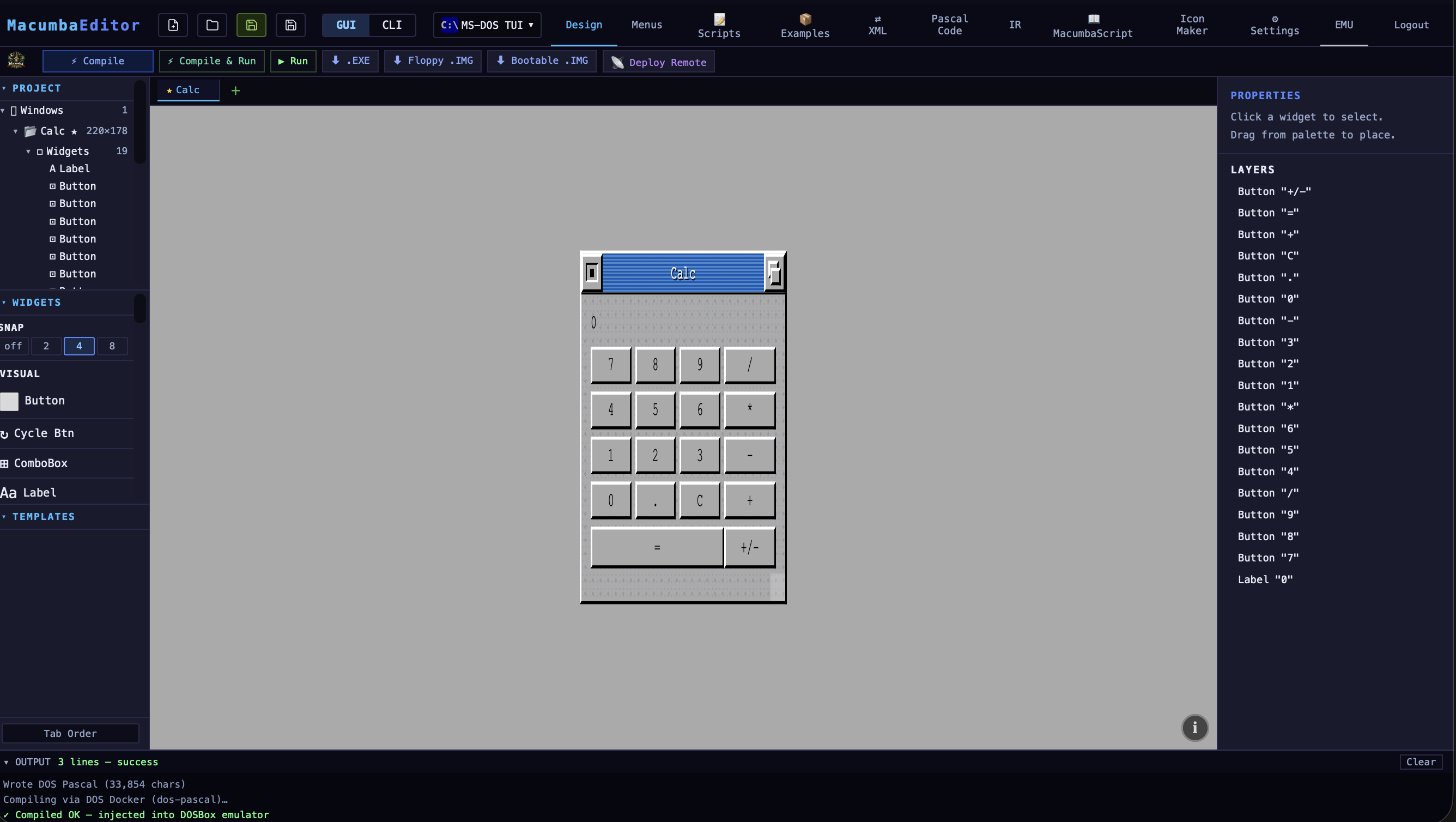
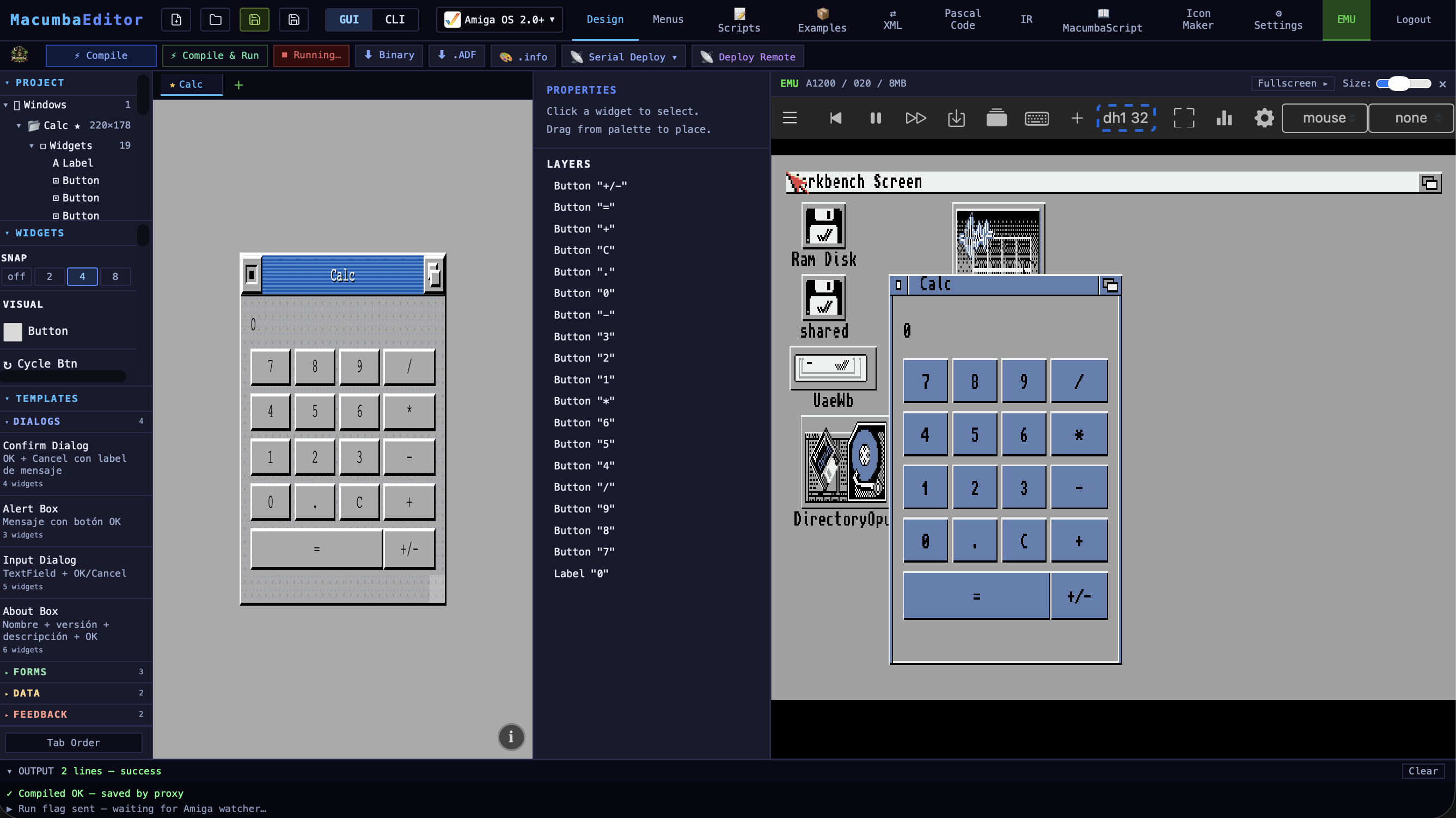
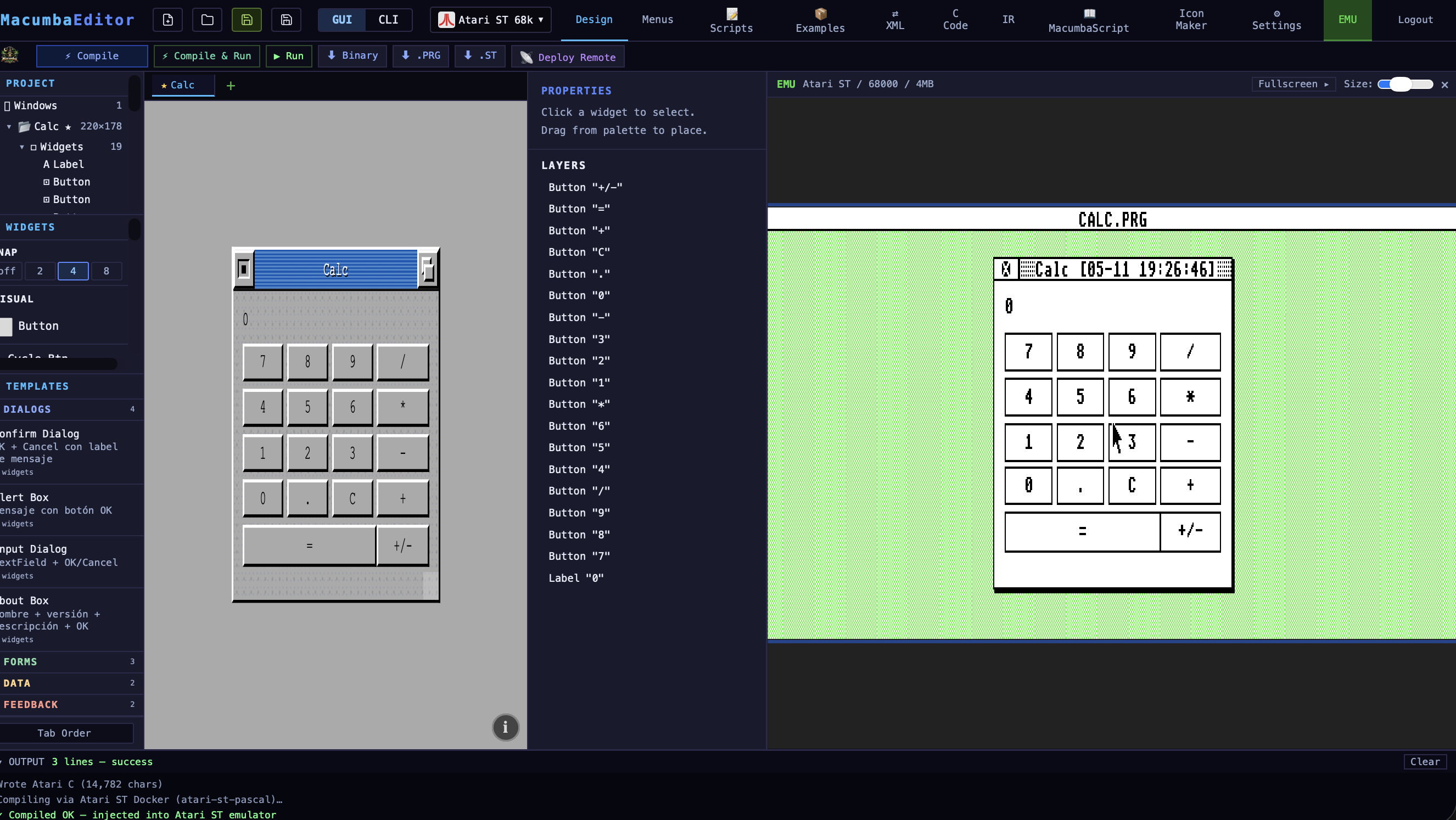
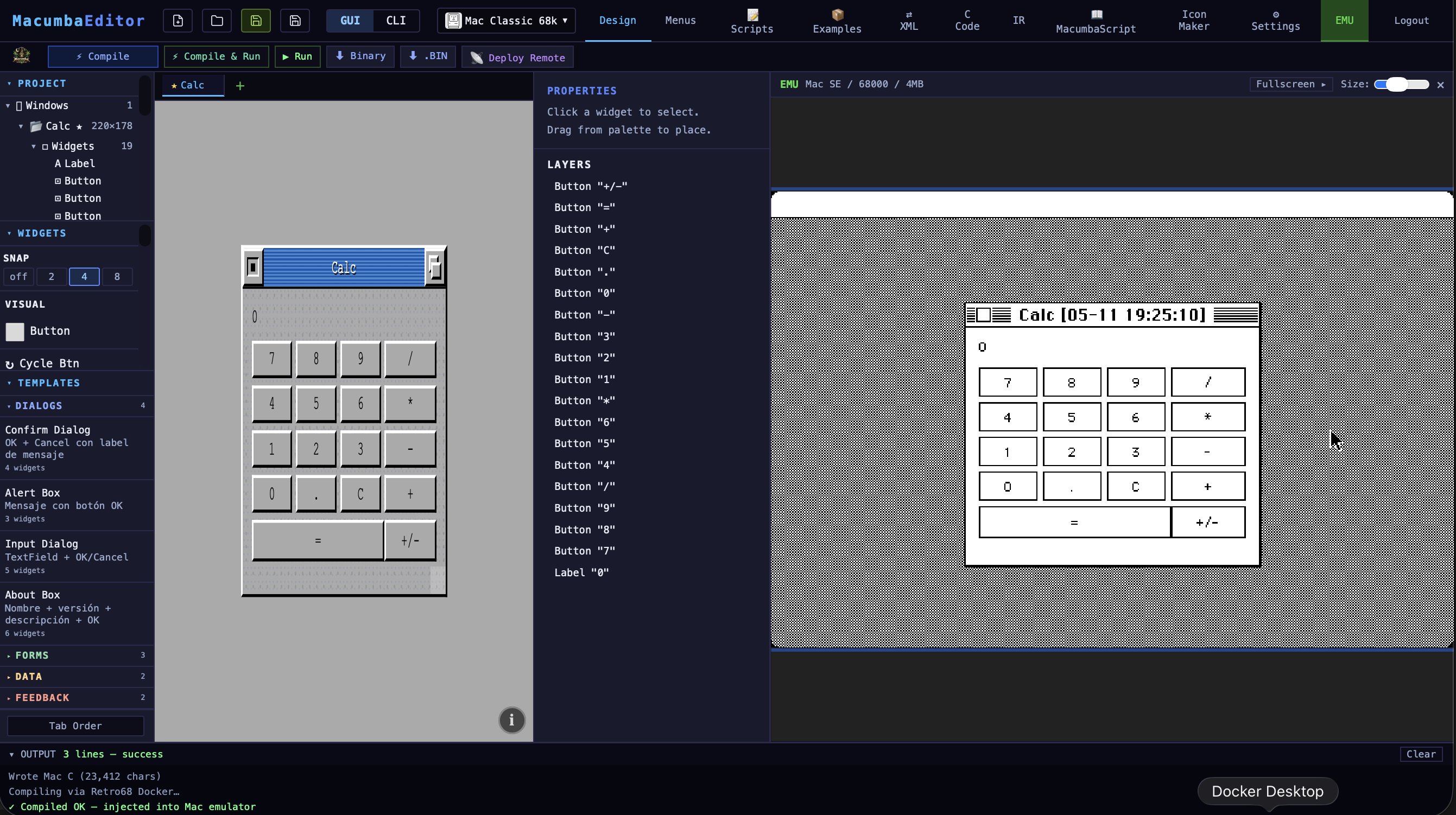
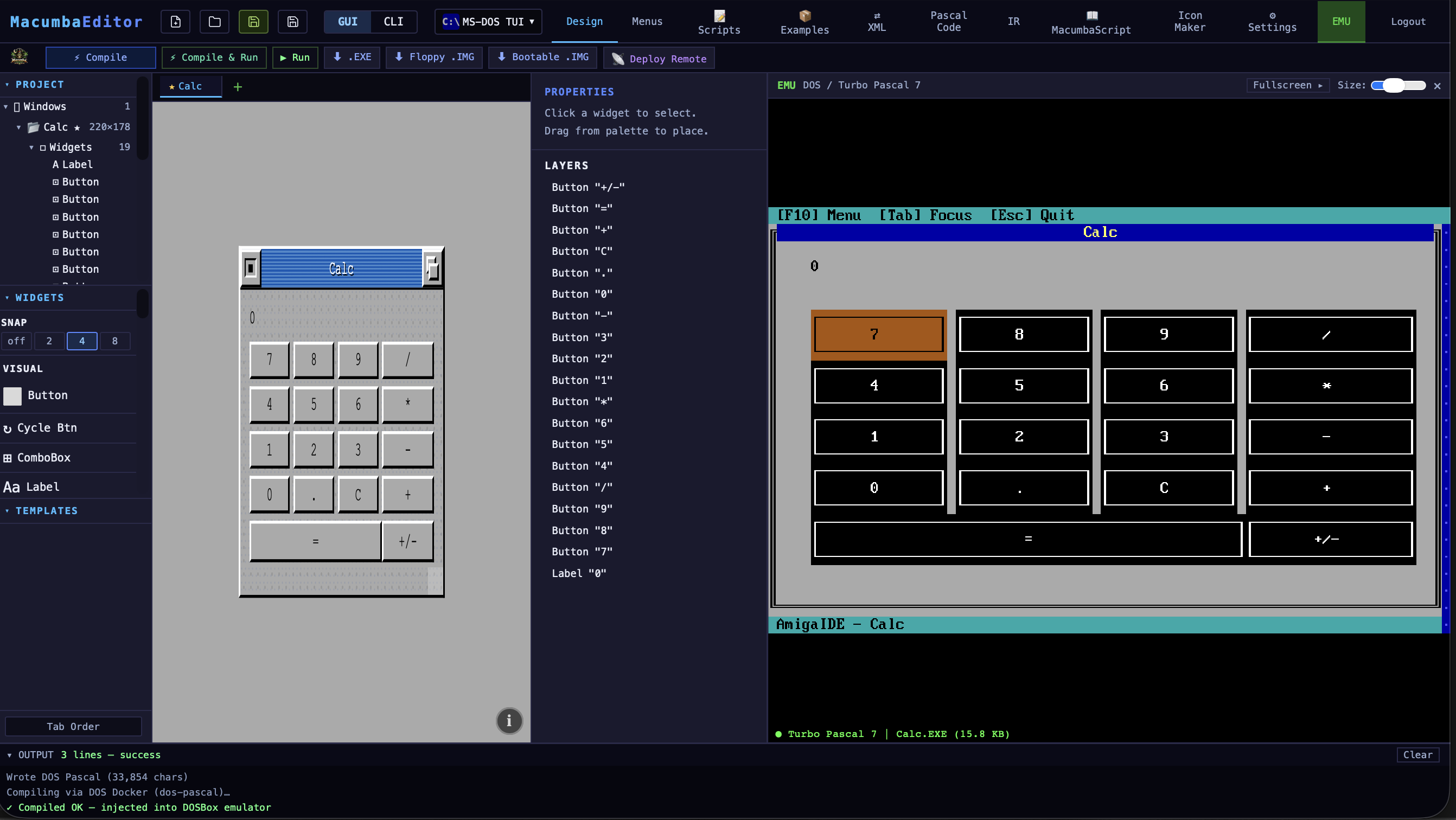
El mismo proyecto, compilado y corriendo en seis plataformas (cada IDE pareado con su emulador).
The same project, compiled and running on six platforms (each IDE paired with its emulator).
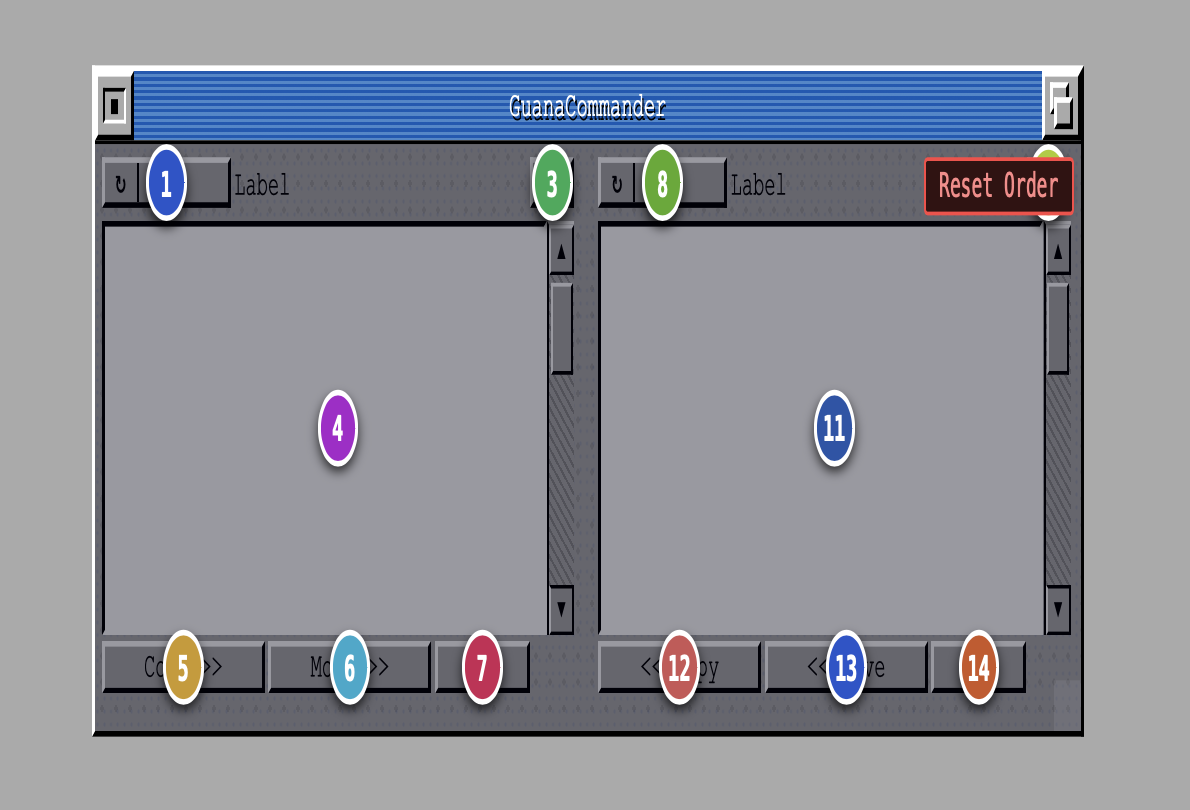
Editor de Tab Order
Como en Delphi: con un click en cada widget elegís el orden en
que el cursor de teclado salta entre ellos al apretar
Tab. TextField → TextField → Button → Checkbox…
lo que vos quieras.
Suena chico, pero es una de esas cosas que hacen sentir nativa a una app: el usuario navega con teclado sin tocar el mouse, en el orden lógico que vos pensaste — no en el orden arbitrario en que fuiste arrastrando widgets al canvas.
Tab Order editor
Just like Delphi: click each widget in turn to set the order
keyboard focus jumps between them when you press
Tab. TextField → TextField → Button → Checkbox…
whatever sequence you want.
Sounds small, but it's one of those things that makes an app feel native: the user navigates by keyboard without touching the mouse, in the logical order you actually designed — not the arbitrary order in which you happened to drag widgets onto the canvas.
De qué está hecho esto
MacumbaEditor no es magia ni un experimento aislado (aunque, para ser justos, el nombre venga literalmente de ahí 🪄). Es una combinación deliberada de varias cosas que ya existen y que la comunidad retro mantuvo vivas durante décadas:
- Toolchains open source de cross‑compilación: Free Pascal (FPC 3.3.1, backend m68k), p2c (Pascal a C), Retro68 (GCC m68k para Mac Classic), m68k‑atari‑mint‑gcc (Atari ST), djgpp (DOS), gcc‑pdp11‑aout (PDP‑11), vasm/vlink, mtools, hfsutils.
- Emuladores embebidos para probar todo desde el browser sin salir del IDE: vAmiga (Amiga), Hatari (Atari ST), PCE.js / 86Box (MS‑DOS), Mini vMac / PCE‑Mac (Mac Classic), SimH (PDP‑11).
- Documentación de la época: los manuales originales de Intuition / Exec, GEM AES/VDI, QuickDraw / Toolbox, BIOS IBM, RT‑11 — todo eso que la gente que sabe escribió en los 80s y 90s y que sigue siendo la fuente de verdad para programar estas máquinas.
- LLMs como acelerador del trabajo cotidiano: leer cientos de páginas de docs de Intuition, comparar APIs entre plataformas, generar el "glue code" por‑plataforma, depurar desensamblados, traducir entre dialectos de Pascal. Ver la siguiente sección — no lo escondo.
What this is built on
MacumbaEditor isn't magic, and it isn't a one‑off experiment (though, to be fair, the name literally comes from there 🪄). It's a thoughtful combination of mature tools and resources the retro community has kept alive for decades:
- Open‑source cross‑compilation toolchains: Free Pascal (FPC 3.3.1 with m68k backend), p2c (Pascal‑to‑C), Retro68 (GCC m68k for Mac Classic), m68k‑atari‑mint‑gcc (Atari ST), djgpp (DOS), gcc‑pdp11‑aout (PDP‑11), vasm/vlink, mtools, hfsutils.
- Embedded emulators for instant in‑browser testing, without leaving the IDE: vAmiga (Amiga), Hatari (Atari ST), PCE.js / 86Box (MS‑DOS), Mini vMac / PCE‑Mac (Mac Classic), SimH (PDP‑11).
- Original period documentation: the Intuition / Exec manuals, GEM AES/VDI guides, Inside Macintosh, IBM PC Technical Reference, RT‑11 docs — written by the people who actually designed these systems, and still the source of truth for programming them.
- LLMs as a serious accelerator for daily work: digesting hundreds of pages of dense docs, comparing APIs across platforms, generating per‑platform glue code, debugging disassemblies, translating between Pascal dialects. See the next section — I'm not hiding it.
Sí, uso LLMs. Mucho. Y quiero sostener que este es justamente uno de los buenos casos de uso de un LLM:
- La alternativa hoy, para desarrollar en plataformas retro, es desigual: hay toolchains abiertas excelentes (FPC, gcc, Retro68…), y también — en muchos casos — herramientas cerradas, abandonadas o con soporte mínimo. Pero lo que directamente no existe es una herramienta visual copada, estilo "Delphi/VB para máquinas de 16 bits" — ese nicho quedó vacío hace 25 años.
- El trabajo está dominado por leer miles de páginas de documentación dispersa (Intuition Reference Manual, RKM, GEM Programmer's Guide, Inside Macintosh, IBM PC Technical Reference) y traducir entre paradigmas de máquinas muy distintas. Eso lo hacen muy bien los LLMs.
- Una sola persona puede atacar seis plataformas en paralelo precisamente porque tiene un acelerador para leer docs, generar "glue code" por‑plataforma, comparar APIs y debuggear desensamblados. Sin eso, esto no existiría.
- Lo que no hace el LLM: diseñar la arquitectura, decidir qué abstracciones cierran, definir qué garantías querés tener entre capas. Tampoco define el lenguaje ni la gramática de MacumbaScript, ni decide qué componentes vale la pena implementar. Eso lo manejo yo — y en el camino aprendí un montón de cosas.
Si tu posición es "los LLMs no sirven para nada útil" — tomalo como contraejemplo. Sin LLMs, este proyecto no existiría; con LLMs, lo hago yo solo y termina siendo open‑source para toda la comunidad retro.
Ahora — la inversa también es cierta, y vale ponerlo arriba de la mesa. ¿Esto se podría hacer a mano, sin LLM? Sí, claro. Free Pascal existe, p2c existe, los compiladores cruzados existen. Pero, ¿cuánto tiempo lleva? Probablemente años para una sola persona, posiblemente nunca. La diferencia no es "se puede vs. no se puede", es cuánto cuesta intentarlo.
Y la pregunta del otro lado: ¿usaría este mismo flujo para un proyecto comercial serio, no hobby, con vidas o plata real arriba? No así. Como toda herramienta, los LLMs tienen limitaciones reales: alucinan, mezclan APIs, inventan flags, no entienden invariantes sutiles. ¿Le pediría a un LLM código crítico de un dominio que no manejo, sin auditar línea por línea? No. Acá funciona porque algo de base manejo — tampoco soy el capo de 68k assembler, pero algo leo, y algo conozco de Intuition / GEM / QuickDraw lo suficiente como para detectar cuando el modelo se desvía o inventa cosas, y corregir el rumbo. Sin esa base mínima, terminás caminando a ciegas.
Punto medio, sentido común: el LLM es un multiplicador de lo que ya sabés hacer. Si sabés algo del dominio, te ahorra meses. Si no, te genera basura plausible que ni vas a poder validar. Esta web no es un manifiesto pro‑LLM ni anti‑LLM — es "este es el tipo de proyecto donde la herramienta tiene sentido, y así la uso".
Yes, I use LLMs. A lot. And I believe this is exactly one of their best real‑world use cases:
- Developing for retro platforms today is uneven: there are excellent open toolchains (FPC, gcc, Retro68…), but also — in many cases — closed, abandoned, or barely supported tools. What's been straight up missing for 25+ years is a proper visual RAD tool — Delphi/VB style — for 16‑bit machines.
- The work is dominated by reading thousands of pages of scattered documentation (Intuition Reference Manual, RKM, GEM Programmer's Guide, Inside Macintosh, IBM PC Technical Reference) and translating between paradigms on very different machines. LLMs are exceptionally good at exactly that.
- One person can realistically attack six platforms in parallel precisely because there's an accelerator that reads docs, generates per‑platform glue, compares APIs and debugs disassemblies. Without it, this project wouldn't exist.
- What the LLM doesn't do: design the architecture, decide which abstractions close cleanly, define the guarantees you want between layers. It also doesn't define the language or the grammar of MacumbaScript, nor decide which components are worth implementing. I still do all of that — and I've learned a ton along the way.
If your position is "LLMs aren't useful for anything real" — take this as a counter‑example. Without LLMs this project wouldn't exist; with LLMs, one person builds it alone and ships it open‑source to the entire retro community.
Now — the inverse is also true, and it's worth putting on the table. Could this be done by hand, no LLM? Sure. Free Pascal exists, p2c exists, the cross‑compilers exist. But how long would it take? Probably years for one person — possibly never. The difference isn't "can vs. can't", it's how much it costs to even try.
And the flip side: would I use this same flow for a serious commercial project — not a hobby, with lives or real money on the line? Not this way. Like any tool, LLMs have real limitations: they hallucinate, mix up APIs, invent flags, miss subtle invariants. Would I trust an LLM with critical code in a domain I don't know, without auditing line by line? No. This works because I have some baseline — I'm not a 68k assembly guru, but I read enough, and I know Intuition / GEM / QuickDraw well enough to spot when the model is making things up and steer it back. Without that minimum baseline, you end up walking blind.
Middle ground, common sense: the LLM is a multiplier on what you already know how to do. If you know something about the domain, it saves you months. If you don't, it produces plausible garbage you can't even validate. This page isn't a pro‑LLM or anti‑LLM manifesto — it's "this is the kind of project where the tool makes sense, and this is how I use it".
Cómo se llega al código nativo
El flujo completo, de arriba hacia abajo:
▸ Por qué Pascal y C, no assembler
- Quería que el código intermedio fuera legible por humanos.
Quien quiera entender qué pasa por dentro, abre el
.paso el.cgenerado y lo lee. Sí, en ASM también se podría — pero buscaba lo más expresivo posible sin perder poder. En máquinas de 16 bits, y para el tipo de aplicación que esta IDE genera (GUIs, apps de productividad, herramientas, prototipos — no demos ni juegos con copper lists ajustadas al ciclo), esto es perfectamente plausible: el overhead de un Pascal o C bien escrito frente a ASM es ínfimo. En máquinas más viejas (Apple II, ZX Spectrum, C64) el tradeoff cambia y empieza a doler — pero ese no es el target. - Aprovecho backends de compilador maduros: FPC (m68k), gcc (m68k/8086/pdp11). Esos backends ya hacen muy buen codegen, optimizan, manejan ABIs raros. Reinventar eso a mano sería absurdo.
- Cada plataforma tiene su GUI toolkit propio: Intuition + RastPort en Amiga, GEM AES/VDI en Atari ST, QuickDraw + Toolbox en Mac, buffer de texto VGA/CGA (B800h) + INT 10h/16h del BIOS en DOS. El layer que elegí como destino (Pascal para Amiga, C directo para el resto) es el que mejor mapea a cada una de esas APIs. Aclaración honesta: el caso de Pascal en Amiga es así porque arranqué a experimentar con eso, me funcionó, y arbitrariamente lo dejé así :) — perfectamente podría haber sido C también. Influyeron además dos cosas: Pascal fue mi primer lenguaje, le tengo cariño; y tomé Delphi como inspiración directa del proyecto — usar el mismo lenguaje cerraba bien por ese lado. De hecho, históricamente las GUIs de la Amiga se solían escribir en C o C++ — no es un camino raro, es el camino estándar.
- Bonus: generar el código nativo como paso intermedio antes de la compilación final no es solo un detalle de implementación — es una feature. Podés leerlo, editarlo, aprender de él. Y la IDE va a permitir, para usuarios que no quieran la capa de abstracción, programar directamente en Pascal o C, sin pasar por MacumbaScript. Y si querés bajar todavía más — se puede embeber ASM dentro del código generado, sin problema.
Lo que MacumbaEditor no es: no es la herramienta para escribir demos del nivel de grupos como The Black Lotus, juegos súper performantes, o cracktros con copper lists complicadas. Pensalo más como un Delphi cross‑plataforma: GUIs nativas, aplicaciones de productividad, herramientas, prototipos. Hay manejo de bajo nivel donde hace falta (puerto serie, TCP, file I/O, eventos raw), pero el foco es la app, no la demo de la party.
▸ Por qué un lenguaje de scripting propio (MacumbaScript)
- Lenguajes generales (Lua, JS, Python) necesitan un runtime. Eso no entra — ni en RAM ni en filosofía — en una máquina de 16 bits con 512 KB.
- Necesitaba algo que transpilara 1:1 a Pascal o C nativo, sin intérprete, sin VM, sin garbage collector. El binario final no carga nada extra: es el .EXE / .PRG / .RUN que esperarías escribiendo a mano.
- MacumbaScript es Pascal aligerado: variables, loops, condicionales,
file I/O, TCP, eventos. Conoce los nombres de los widgets
del canvas —
output.text := str(result)se resuelve al label específico en cada plataforma, con su redibujado correcto por debajo. - Se aprende en una tarde. Si ya escribiste Pascal, Delphi, o incluso AMOS / Blitz Basic en los 90, vas a estar en casa.
- Limitaciones arbitrarias, justificadas por diseño.
MacumbaScript tiene un alcance acotado a propósito.
Ejemplo: podés manipular widgets creados desde el editor
visual (cambiarles texto, esconderlos, mover, leer su
valor) — pero no podés crear widgets dinámicamente
en runtime. La razón es mantener un tradeoff sano entre
poder expresivo y complejidad del runtime:
si dejara construir GUIs arbitrarias en runtime, necesitaría
memoria dinámica seria, reflection, un sistema de layout y
otras cosas que no caben ni en RAM ni en filosofía. El objetivo
es GUIs nativas rápidas de armar para retrocomputadoras,
no un framework todo‑terreno.
Y acá está la conexión con los LLMs: los modelos son excelentes traduciendo entre lenguajes y paradigmas — y todavía más cuando el lenguaje de origen está muy bien definido. Y si son buenos traduciendo, también lo son generando un traductor: ojo, el LLM no traduce mi código en runtime — me ayudó a escribir el codegen que lo traduce de forma determinista. La app que corre en la Amiga no consulta a un modelo en la nube; corre el Pascal/C nativo que el codegen (escrito por mí + LLM) generó offline.
Por eso, si defino un lenguaje con alcance acotado y reglas predecibles — sin metaprogramación, sin reflection, sin creación dinámica de objetos — el codegen es más simple, más fácil de razonar, y más fácil de garantizar correcto. La misma lógica aplica al AST de bloques visuales: al tener un formato rígido, con un set acotado de nodos y sin estructuras dinámicas, el codegen que lo procesa vive en un terreno chico y predecible — más fácil de cubrir con tests, más difícil de romper. Cuanto más cerrada está la superficie del lenguaje (y del AST), menos margen tiene el LLM (al escribir el codegen) para inventar cosas o desviarse. Las limitaciones del lenguaje son, en parte, una forma de mantener la traspilación dentro de un terreno en el que se puede confiar. Dicho de otra forma: el lenguaje fue diseñado consciente de las limitaciones del modelo.
How I get to native code
The full flow, top to bottom:
▸ Why Pascal and C, not assembly
- I wanted the intermediate code to stay readable by humans.
Anyone curious about what's happening underneath can open the
generated
.pasor.cand follow along. Yes, ASM would work too — but I was after the most expressive option without giving up power. On 16‑bit machines, and for the kind of applications this IDE is meant to generate (GUIs, productivity apps, tools, prototypes — not demos or games with cycle‑tight copper lists), this is perfectly viable: the overhead of well‑written Pascal or C versus hand‑rolled ASM is tiny. On older machines (Apple II, ZX Spectrum, C64) the tradeoff shifts and starts to hurt — but those aren't the target here. - I lean on mature compiler backends: FPC (m68k), gcc (m68k / 8086 / pdp11). They already deliver excellent codegen, optimization and weird‑ABI handling. Reinventing that by hand would be absurd.
- Every platform has its own GUI toolkit: Intuition + RastPort on Amiga, GEM AES/VDI on Atari ST, QuickDraw + Toolbox on Mac, VGA/CGA text buffer (B800h) + BIOS INT 10h/16h on DOS. The intermediate target I picked (Pascal for Amiga, direct C for the rest) maps cleanly onto each of those APIs. Honest disclaimer: the Pascal‑on‑Amiga choice is what it is because I started experimenting with Pascal, it worked, and I arbitrarily kept it :) — it could just as easily have been C. Two other things pushed me there: Pascal was my first programming language, I have a soft spot for it; and I took Delphi as a direct inspiration for this project — using the same language closed the loop nicely. Historically, Amiga GUIs were typically written in C or C++ — this isn't an exotic path, it's the standard one.
- Bonus: emitting native code as an intermediate step before the final compile isn't just an implementation detail — it's a feature. You can inspect it, edit it, learn from it. And the IDE will let users who don't want the abstraction layer code directly in Pascal or C, skipping MacumbaScript entirely. Want to go even lower? You can embed ASM inside the generated code, no problem.
What MacumbaEditor isn't: it's not the tool to build The Black Lotus‑level demos, hyper‑optimized games, or cracktros with intricate copper lists. Think of it more as a cross‑platform Delphi: native GUIs, productivity apps, tools, prototypes. Low‑level access is there where it matters (serial, TCP, file I/O, raw events), but the focus is on the application — not on the demoparty release.
▸ Why a custom scripting language (MacumbaScript)
- General‑purpose languages (Lua, JS, Python) need a runtime. That doesn't fit — not in RAM, not in philosophy — on a 16‑bit machine with 512 KB.
- I needed something that transpiles 1:1 to clean Pascal or C: no interpreter, no VM, no garbage collector, no extra overhead. The final binary doesn't load anything extra; it's the .EXE / .PRG / .RUN you'd expect from writing it by hand.
- MacumbaScript is Pascal‑lite: variables, loops, conditionals,
file I/O, TCP, events. It's widget‑aware — write
output.text := str(result)and the transpiler resolves it to the right label on each platform, with the correct redraw underneath. - You can pick it up in an afternoon. If you've ever written Pascal, Delphi, or even AMOS / Blitz Basic back in the 90s, you'll feel right at home.
- Deliberate, design‑justified limitations.
MacumbaScript has a deliberately bounded scope.
Example: you can manipulate widgets created from the visual
editor (change text, hide, move, read values) — but you
can't dynamically create widgets at runtime. The
reason is to keep a sane tradeoff between expressive
power and runtime complexity: dynamic runtime
GUIs would require serious dynamic memory, reflection, a layout
engine, and other things that fit neither in RAM nor in
philosophy. The goal is fast‑to‑build native GUIs for
retrocomputers, not a general‑purpose framework.
And this is where the LLM angle comes in: LLMs are excellent translators between languages and paradigms — and even better when the source language is well defined. And if they're good at translating, they're also good at generating a translator: note, the LLM doesn't translate my code at runtime — it helped me write the codegen that does the translation deterministically. The app running on the Amiga doesn't phone home to a model; it runs the native Pascal/C the codegen (written by me + the LLM) produced offline.
So, if I design a language with a bounded scope and predictable rules — no metaprogramming, no reflection, no dynamic object creation — the codegen is simpler, easier to reason about, and easier to guarantee correct. The same logic applies to the visual AST blocks: because the AST has a rigid format — a bounded set of node types, no dynamic shapes — the codegen that walks it lives in a small, predictable space, easier to cover with tests and harder to break. The narrower the language surface (and the AST), the less room the LLM (while writing the codegen) has to make things up or drift. The language restrictions are, in part, a way to keep the transpilation inside a region you can actually trust. Put another way: the language was designed with the model's limitations in mind.
Plataformas soportadas
- Amiga — soporte desde AmigaOS 1.x (Kickstart 1.3, A500 stock) hasta 3.x (Workbench 3.1, 030/060). No usamos MUI, ni ClassAct, ni ninguna lib externa: si tu Amiga tiene AmigaOS, la app generada arranca de una, sin instalar nada adicional. El codegen mira la versión target y elige las APIs del sistema disponibles ahí.
- Macintosh Classic 68K — GUI nativa con
QuickDraw + Toolbox, sin dependencias externas
(sin frameworks de terceros, sin runtime extra: lo que viene de
fábrica con el System alcanza). El codegen pasa por
Retro68 (GCC m68k) y empaqueta el resultado en
MacBinary— listo para meter en Mini vMac, Basilisk II o un Mac real. Compatible con System 6 y System 7.
Detalle interesante: como Apple mantuvo compatibilidad hacia atrás durante toda la era PowerPC — el "68k emulator" venía incorporado en Mac OS hasta Mac OS 9 — los binarios m68k que genera MacumbaEditor corren en un rango enormemente amplio de máquinas Apple, desde Macs originales 68k hasta PowerPC sobre Mac OS Classic. - Atari ST — soporte GUI nativo vía
GEM AES/VDI, generando archivos
.PRGy disquetes.stlistos para Hatari o STeem. Andan en TOS 1.04+; color o monocromo. - MS‑DOS: hablamos de TUI / GUI de texto, no de Windows. La pregunta obvia es "¿y por qué no Windows 3.x / 95?". Quizás en algún momento — pero prefiero cubrir más máquinas reales generando UIs de texto bien hechas en DOS. Crear UIs rápido en MS‑DOS le aporta mucho a las PCs viejas que apunto; va a ser más rico que pelear con las primeras versiones de Windows, que son totalmente incompatibles entre sí y un dolor de cabeza para sostener un único codegen.
- PDP‑11
[muy experimental — work in progress]
— está más que nada porque se puede: el target apareció
casi como ejercicio, una vez que el resto del pipeline ya tenía
forma de "agregar plataformas". Obviamente, el caso PDP‑11 es
solo CLI — RT‑11 corre en una terminal, no hay GUI
nativa que tenga sentido perseguir ahí. Lo que ya funciona:
compila CLI básico a
.SAVcon gcc‑pdp11‑aout y arranca en SimH; lo que todavía rompe: programas con ciertos entry points cuelgan al ejecutarse (problema conocido, en standby). No esperes que esté listo para usar en serio todavía — es más bien un campo de pruebas. - CLI también para las otras plataformas — la IDE no es solo GUI. Podés generar apps de consola para Amiga, ST, Mac y DOS también, usando los mismos componentes (file I/O, strings, TCP, puerto serie) sin la capa de widgets.
Supported platforms
- Amiga — support spans AmigaOS 1.x (Kickstart 1.3, stock A500) all the way through 3.x (Workbench 3.1, 030/060). No MUI, no ClassAct, no external libraries: if your Amiga has AmigaOS, the generated app just runs — nothing extra to install. The codegen inspects the target version and picks whichever system APIs are available there.
- Macintosh Classic 68K — native GUI via
QuickDraw + Toolbox, no third‑party frameworks,
no extra runtime (what ships with System is enough). The codegen
goes through Retro68 (GCC m68k) and packages the
result as
MacBinary— ready to drop into Mini vMac, Basilisk II or a real Mac. Compatible with System 6 and System 7.
Fun detail: because Apple maintained backward compatibility all the way through the PowerPC era — the "68k emulator" was built into Mac OS up to Mac OS 9 — the m68k binaries MacumbaEditor produces run on an enormously wide range of Apple machines, from the original 68k Macs all the way to PowerPC under Classic Mac OS. - Atari ST — native GUI support via
GEM AES/VDI, producing
.PRGexecutables and.stfloppy images ready for Hatari or STeem. Runs on TOS 1.04+, color or monochrome. - MS‑DOS: rich text‑mode UIs (TUI), not Windows. The obvious question is "why not Windows 3.x / 95?". Maybe down the road — but for now I'd rather cover more real machines by generating well‑built text UIs on DOS. Quick UI creation on MS‑DOS adds a lot to the old PCs I target; it'll be richer than fighting with the early Windows versions, which are mutually incompatible and a nightmare to sustain from a single codegen.
- PDP‑11
[highly experimental — work in progress]
is in there mostly because it can be done: the target
showed up almost as an exercise, once the pipeline already had
the shape of "add a platform". Naturally, it's CLI only
— RT‑11 lives in a terminal; there's no native GUI worth chasing.
What works today: basic CLI programs compile to
.SAVvia gcc‑pdp11‑aout and run in SimH; what's still broken: programs with certain entry points hang on launch (known issue, on hold). Don't treat this as production‑ready yet — it's more of a playground. - CLI on the other platforms too — the IDE isn't only for GUIs. You can build console apps for Amiga, ST, Mac and DOS as well, using the same building blocks (file I/O, strings, TCP, serial) without the widget layer.
Standalone + Online
MacumbaEditor se va a distribuir en dos formas, con la misma funcionalidad:
- IDE standalone — instalable para Mac, Linux y Windows. Todo corre en tu máquina.
- Versión 100% online — todo el editor, todos los compiladores y todos los emuladores corriendo desde el browser. No instalás nada: entrás, codeás, compilás y probás en el emu embebido.
El IDE incluye dos launchers para mandar el
binario a una retro real o emulada:
(1) Launcher por puerto serie (USB‑Serial,
RS‑232) para deploys directos por cable a Amigas, STs, PCs y
Macs reales; y (2) Launcher por TCP para
emuladores con puerto serie tunelizado o retrocomputadoras
conectadas por red (vía bridge serial‑a‑TCP). Hablan con módulos
Meshtastic, microcontroladores y todo lo que asome por
/dev/ttyUSB* o COM*.
En la versión online, el acceso al puerto serie del host se
resuelve con un pequeño agente local (o la
Web Serial API del browser donde esté disponible) —
la idea es que la web y la standalone hagan lo
mismo, sin que tengas que elegir.
Aclaración honesta: sinceramente no conocía la
Web Serial API. Me lo comentó mi amigo
Alecu — me confirmó que es posible — así que
queda en la lista para implementarlo y que se pueda usar
directo desde la web, sin agente local de por medio.
Bonus de generar binarios + imágenes de disco:
MacumbaEditor no solo emite el .exe / .PRG / MacBinary / .SAV
nativo por plataforma — también arma imágenes de disco
listas para usar: .adf de Amiga,
.st de Atari, .img bootable de DOS,
.img / .dsk HFS de Mac (para Mini vMac /
Basilisk II) y .dsk de RT‑11. Las metés directo en
un emulador o las flasheás a un Gotek / disquete real /
SD para probar en hardware auténtico en segundos.
Standalone + Online
MacumbaEditor will ship in two forms with the same functionality:
- Desktop IDE — installable on Mac, Linux and Windows. Everything runs locally.
- 100% browser version — full editor, all the compilers, all the emulators running straight in‑browser. No install: open it, code, compile, test in the embedded emu.
The IDE ships with two launchers to push the
binary onto a real or emulated retro machine:
(1) Serial launcher over the host's serial port
(USB‑Serial, RS‑232) for direct cable deploys to real Amigas,
STs, PCs and Macs; and (2) TCP launcher for
emulators with a tunneled serial port, or for retrocomputers
reachable over the network via a serial‑to‑TCP bridge. They both
talk to Meshtastic modules, microcontrollers and anything else
that shows up on /dev/ttyUSB* or COM*.
In the browser version, host serial port access is bridged
through a small local agent (or the browser's
Web Serial API where available) — the goal is for
web and standalone to do the same thing, with
no compromises you have to choose between.
Honest aside: I genuinely didn't know the
Web Serial API existed. My friend
Alecu pointed it out — he confirmed it's
doable — so it's on the list to implement, so you'll be able
to use the serial port straight from the browser, with no
local agent in the middle.
Bonus — binaries and disk images:
MacumbaEditor doesn't just emit the native .exe / .PRG /
MacBinary / .SAV per platform — it also builds
ready‑to‑use disk images: Amiga .adf,
Atari .st, bootable DOS .img, Mac HFS
.img / .dsk (for Mini vMac / Basilisk II)
and RT‑11 .dsk. Drop them straight into an emulator,
or flash them onto a Gotek, a real floppy, or an SD card,
and test on authentic hardware in seconds.
Estado del proyecto
Antes del lanzamiento público, se va a abrir el acceso para testing privado a un grupo chico de usuarios elegidos — para curtir bordes ásperos y ajustar lo que haga falta antes de que esto salga al mundo. Si te interesa, escribime.
Y acá va lo importante: la mejor manera de entender qué es este proyecto va a ser viendo los programas concretos que voy a ir subiendo.
📂 Mirá Ejemplos — la sección va a crecer en las próximas semanas con apps reales, chiquitas pero útiles, compiladas para todas las plataformas soportadas. Por ahora ya hay uno usable que se apoya en el componente Serial: el cliente Meshtastic chat compilado para Amiga, ST, Mac y DOS.
Lanzamiento público: en algún momento entre fines de 2026 y 2027. Va a ser open‑source — licencia libre, código en GitHub, contribuciones bienvenidas.
El esfuerzo ahora mismo está concentrado en tres frentes:
- Cerrar el soporte por plataforma — completar features hasta que la matriz "todos los widgets × todas las plataformas" esté verde.
- Documentar — manual de usuario, referencia de widgets, guías por plataforma, "cómo agregar una plataforma nueva". Si nadie más que el autor entiende el código, no sirve.
- Modularizar — el codegen, la transpilación y
las capas de soporte por plataforma están siendo
reestructuradas para que el proyecto no se convierta en bloatware
inmantenible. La idea es que sumar una plataforma nueva sea un
módulo aparte, no una cirugía interna.
Y un punto importante: está todo muy bien usar LLMs, pero nadie quiere quedar preso de Claude — ni de ningún modelo en particular. El código tiene que poder leerse, mantenerse y extenderse por cualquier humano, y por cualquier LLM. Si la única forma de tocar este repo es con un modelo específico que recuerde 6 meses de contexto, está mal diseñado. Modularizar también apunta a eso.
Project status
Before the public release, access will open for private testing to a small group of selected users — to iron out rough edges and tune whatever needs tuning before this goes out into the world. If you're interested, drop me a line.
And here's the important part: the best way to understand what this project really is will be by looking at the concrete programs I'll be uploading.
📂 Check Examples — the section will grow over the coming weeks with real, small, actually‑useful apps compiled for every supported platform. There's already one usable example built around the Serial component: the Meshtastic chat client, compiled for Amiga, ST, Mac and DOS.
Public release: late 2026 — 2027. Fully open‑source on GitHub, free license, contributions welcome.
Effort right now is focused on three fronts:
- Closing per‑platform support — finishing features until the "every widget × every platform" matrix is green.
- Documentation — user manual, widget reference, per‑platform guides, a "how to add a new platform" cookbook. If only the author can read the code, the project isn't useful.
- Modularizing — the codegen, the transpiler
and the per‑platform support layers are being restructured so
the project doesn't drift into unmaintainable bloat. The goal:
adding a new platform should be its own self‑contained module,
not internal surgery.
And one important point: using LLMs is fine, but nobody wants to get locked into Claude — or any single model. The code has to be readable, maintainable and extensible by any human, and by any LLM. If the only way to work on this repo is with one specific model that remembers six months of context, it's badly designed. Modularizing is partly aiming at that too.
Lanzamiento estimado: fines de 2026 — algún momento de 2027 ▮
Estimated release: late 2026 — sometime in 2027 ▮
Acerca del autor
José Francisco "Pancho" Manera
Licenciado en Ciencias de la Computación por la Universidad Nacional del Sur (Bahía Blanca, Argentina). Hace años que orienta su trabajo al mundo emprendedor y al desarrollo de software, con un interés particular por la historia de la computación y la preservación digital.
Cofundador del Museo de Informática Espacio TEC (Bahía Blanca) — uno de los espacios de preservación informática más importantes de Latinoamérica. Coleccionista, desarrollador retro y curador de hardware/software histórico.
Actualmente impulsa, junto a Espacio TEC y con apoyo de la Vintage Computer Federation, el Vintage Computer Festival Latin America.
Contacto: josemanera[ARROBA]gmail.com · francisco[ARROBA]espaciotec.com.ar
About the author
José Francisco "Pancho" Manera
Computer Science graduate from Universidad Nacional del Sur (Bahía Blanca, Argentina). Entrepreneur, software developer, and a long‑time passionate retrocomputing enthusiast — with a particular interest in the history of computing and digital preservation.
Co‑founder of Museo de Informática Espacio TEC (Bahía Blanca) — one of Latin America's leading computing‑preservation spaces. Collector, retro developer, and curator of historical hardware and software.
Currently driving, together with Espacio TEC and with support from the Vintage Computer Federation, the Vintage Computer Festival Latin America.
Contact: josemanera[AT]gmail.com · francisco[AT]espaciotec.com.ar
P.D.: sí, obviamente esta página la hice con un LLM. Detesto la programación web 🌐. Coherencia total con todo lo que se dice más arriba — buen caso de uso, lo uso, no lo escondo.
P.S.: yes, obviously I built this page with an LLM. I genuinely hate web programming 🌐. Fully consistent with everything said above — good use case, I use it, I don't hide it.